
Duro changelog
Document Use & Altium PCB Viewer (v1.1.12)
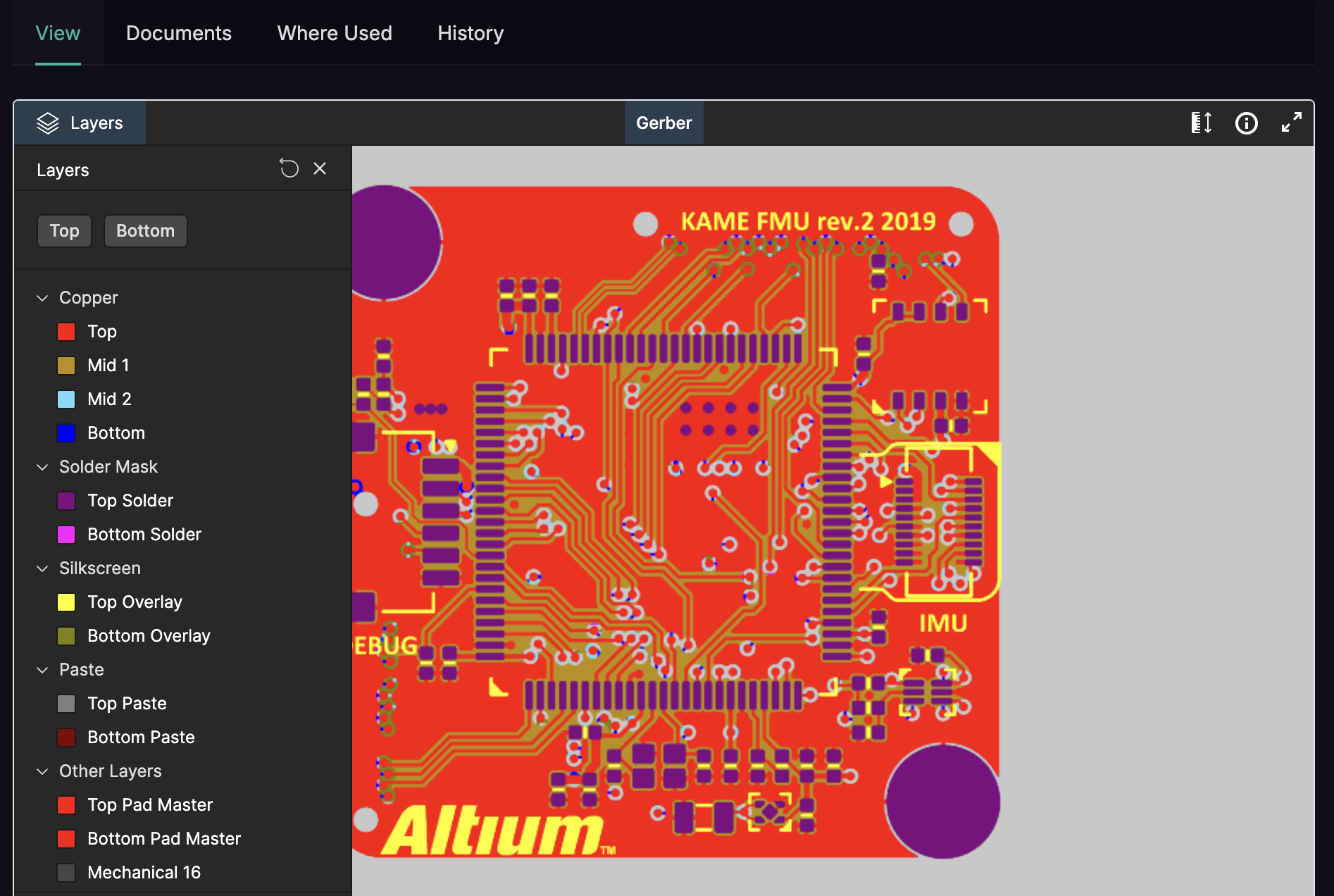
This release brings native PCB design viewing directly into Duro — no more switching between tools to inspect your board layouts. Combined with powerful new document traceability features, you now have complete visibility into your hardware designs and their dependencies.
What's New
Altium PCB Viewer Integration: View your PCB designs directly within Duro. Inspect board layouts, layer stackups, and component placements without leaving your PLM workflow. Supports Altium project files, Gerber files, and other manufacturing formats — giving your entire team visibility into designs regardless of their CAD licenses.
Document Where Used: Ever wondered where a datasheet or spec is referenced across your projects? Now you can instantly see every component and assembly that links to a document. Understand the blast radius before updating shared files and keep your documentation in sync with your designs.
Smart File Validation: The viewer automatically detects valid PCB design archives and provides clear feedback when files can't be displayed — no more guessing why a preview isn't loading.
Improvements & Fixes
Added support for Gerber and additional manufacturing file formats in the PCB viewer
Improved error handling for corrupted or incomplete design files
Enhanced security with proper file access authorization
Better internationalization support across the viewer interface
Fixed race conditions when switching between design files