
Duro changelog
Smarter component search and filtering (2.1.3)
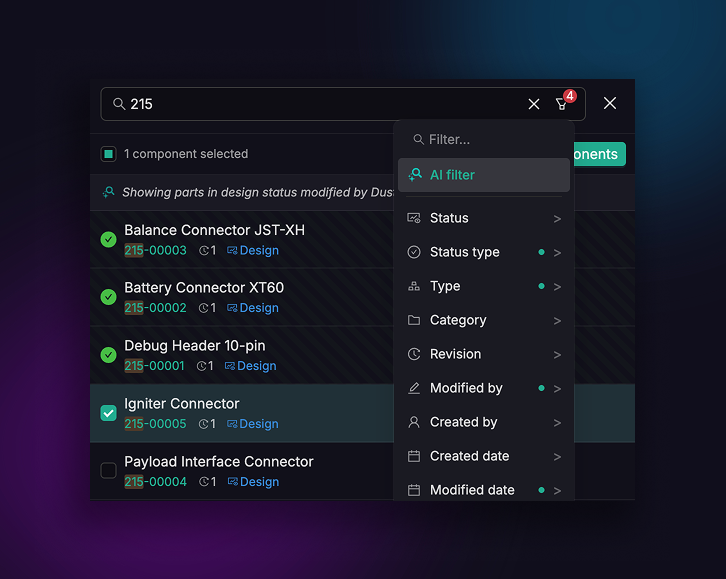
Finding the right part in a growing library shouldn't feel like guesswork. We rebuilt the component selection drawer from the ground up with a search and filter system that actually keeps up with how engineers think.
Search that works with you, not against you. Type a component name or CPN and results appear instantly as you type — no waiting on AI inference, no blank states when a service hiccups. We prioritize name and CPN matches for speed, and subtly highlight matching characters in your results so you can scan with confidence.
Search and filters, together. This is the big one. Search and advanced filters now work as a team: search within a filtered set, or narrow down search results with filters. Status, category, type, revision, created by, modified by, date ranges — they all compose naturally. And for more complex queries, the AI filter is still there with a plain-language explainer so you know exactly what it's doing.
A cleaner layout for faster scanning. Revision and status indicators now sit compact next to CPNs, giving component names the full width of the drawer. Already-added parts are surfaced at the top with a distinct visual treatment, so you always know what's in your selection without scrolling.
The previous drawer was entirely dependent on AI for search — if AI was unavailable, search broke. This version treats AI as a power tool, not a crutch. The core search and filter experience is fast, deterministic, and reliable by default.