
Duro changelog
Custom Export Templates & Version Mix-matching (2.1.17/2.1.18)
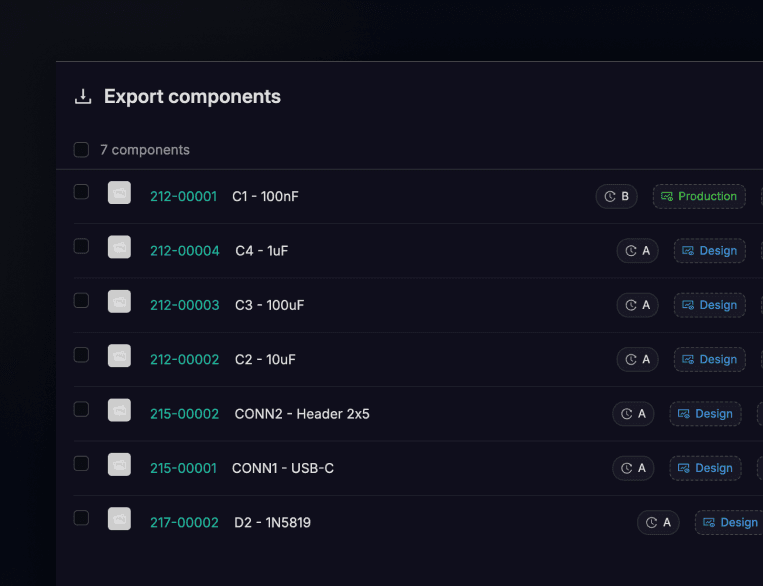
You've been able to export BOMs for a while now. But until today, you got what we gave you — a single format, pulling from whatever revision happened to be released. If you needed something different, you were editing spreadsheets after the fact.
Not anymore. Custom export templates let you define exactly what goes into your BOM exports — which columns, what order, how they're labeled. Build a template once, reuse it across components. And here's the part that changes the game: you can now mix and match component versions in a single export. Need to pull your top-level assembly from the released revision but include a pre-release child component you're testing? Done. Export reflects exactly what you're building, not what the system assumes you want.
This is the kind of flexibility you need when you're juggling multiple development streams or coordinating with contract manufacturers who have their own format requirements. Templates save time. Version control gives you accuracy.
Also in this release
Component history now tracks structural changes. BOM additions, removals, and updates all show up in the History tab now. Same for document attachments and label assignments. You can finally see when someone added that fastener or changed that spec sheet — not just who released the component.
Change Order Templates. What was already available in the API, you can now create and customize ECO workflows directly in-app! Create multi-stage, multi-approval workflows, set resolutions to either auto or manual close, and most importantly - create custom form content fields for your engineers to fill out during the ECO creation process.
Fixes
Fixed scrolling behavior, cache invalidation, and sticky header issues flagged during UAT.
Changed the default CAD file sync mode to manual-only. You're in control of when native files get pushed.