
Duro changelog
Graduated Lab Features (2.1.20)
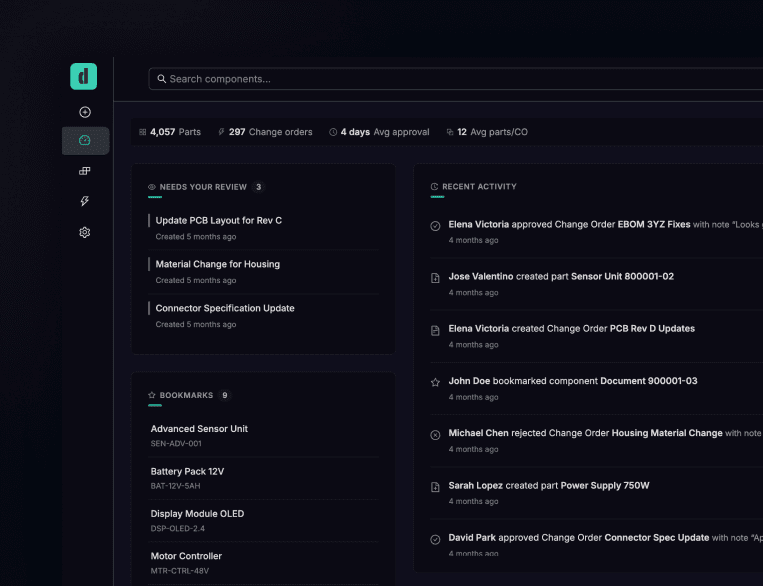
Four features we've been testing in select libraries just became standard equipment. No admin setup, no opt-in — they're just there now.
The library dashboard is now your default landing page. Instead of dropping you into a component list, you get the overview first: recent activity, your personal bookmarks, ECOs that need your attention, top contributors, and health metrics. The component list is still one click away, but most people found themselves wanting context before diving into parts. Now you get it by default.
Component labels let you tag parts with custom metadata — think "RoHS compliant" or "preferred vendor" or whatever taxonomy makes sense for your org. We soft-launched this months ago and watched teams build surprisingly surprising classification systems. It's proven itself.
The Altium PCB viewer renders your board files directly in Duro. No downloads, no opening Altium just to see a layout. If you're reviewing a change order that touches a PCB, you can see what actually changed without leaving the browser.
And library pinning — the small one that matters more than it should. Pin the components you use daily to the top of your library part list. Sounds trivial until you're managing thousands of parts and tired of scrolling past the ones you haven't touched in months.
These were lab features because we wanted to validate them with real usage before committing. They passed. They're baseline now.
Also in this release
Change orders now support a "withdrawn" resolution option — for when you need to pull a CO back without rejecting or approving it.
Generated Onshape documents (assemblies, drawings) now flow into change orders automatically when you create them from a release.
Fixes
Fixed a bug where the change order details tab would show unsaved changes even after saving.
Corrected error handling in Onshape document generation — the "failed" state now triggers properly instead of hanging.
Withdrawal notifications and email templates now handle the new resolution type consistently.