
Duro changelog
New Search, with and without AI (2.1.21)
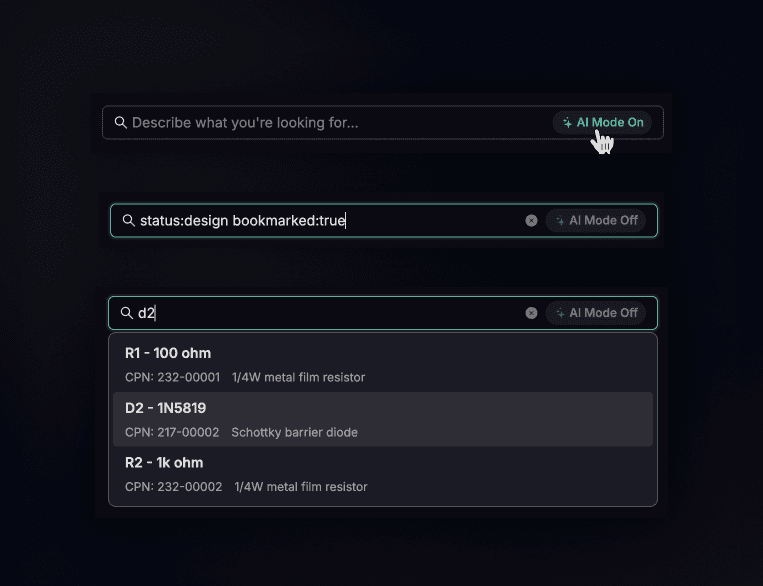
Search got a brain transplant — and it remembers how to think like you do.
We rebuilt global search from the ground up. You can now search two ways: ask questions in natural language and let AI interpret what you mean (we've had this over a year now), or use precise key:value syntax when you know exactly what you're hunting for. Both live in the same bar. Hit ⌘ + K (or Ctrl+K) and start typing.
The AI mode understands context. "Show me resistors we haven't touched in six months" works. So does "parts made by John that cost more than $5." It parses your intent, translates it into filters, and shows you what it understood before running the search. No black box guessing.
But sometimes you don't want interpretation — you want exactness. That's where key:value syntax comes back. Type manufacturer:Molex price:>5 and you get precisely that. No ambiguity, no AI second-guessing your query. We've documented the full syntax here — it's more powerful than before!
The search bar now suggests results as you type, and clicking a suggestion takes you straight to that component's detail page.
Also in this release
Auto-mapping for imports — Quantity and Item Number now map automatically when importing data. Fewer manual column assignments.
Fixes
Fixed attribute filters not working correctly when negated (e.g., "does not contain")
Fixed label filters using internal IDs instead of human-readable names
Fixed search filters on revision and description fields returning incorrect results
Fixed attribute type checking causing some queries to fail silently